For business owners
Your money and the business’s, kept apart in one place
Know what the business has left after bills.
One login for both. Tag each bank and account as personal or business, and ask about either side on its own. ClarityTrack reads your accounts and never moves, sends or spends money.

Both sides, kept apart
Each account and each charge sits on the side you choose
Tag it when you connect
Mark each bank, and each account inside it, as personal or business. You can change it later.
Move a single charge
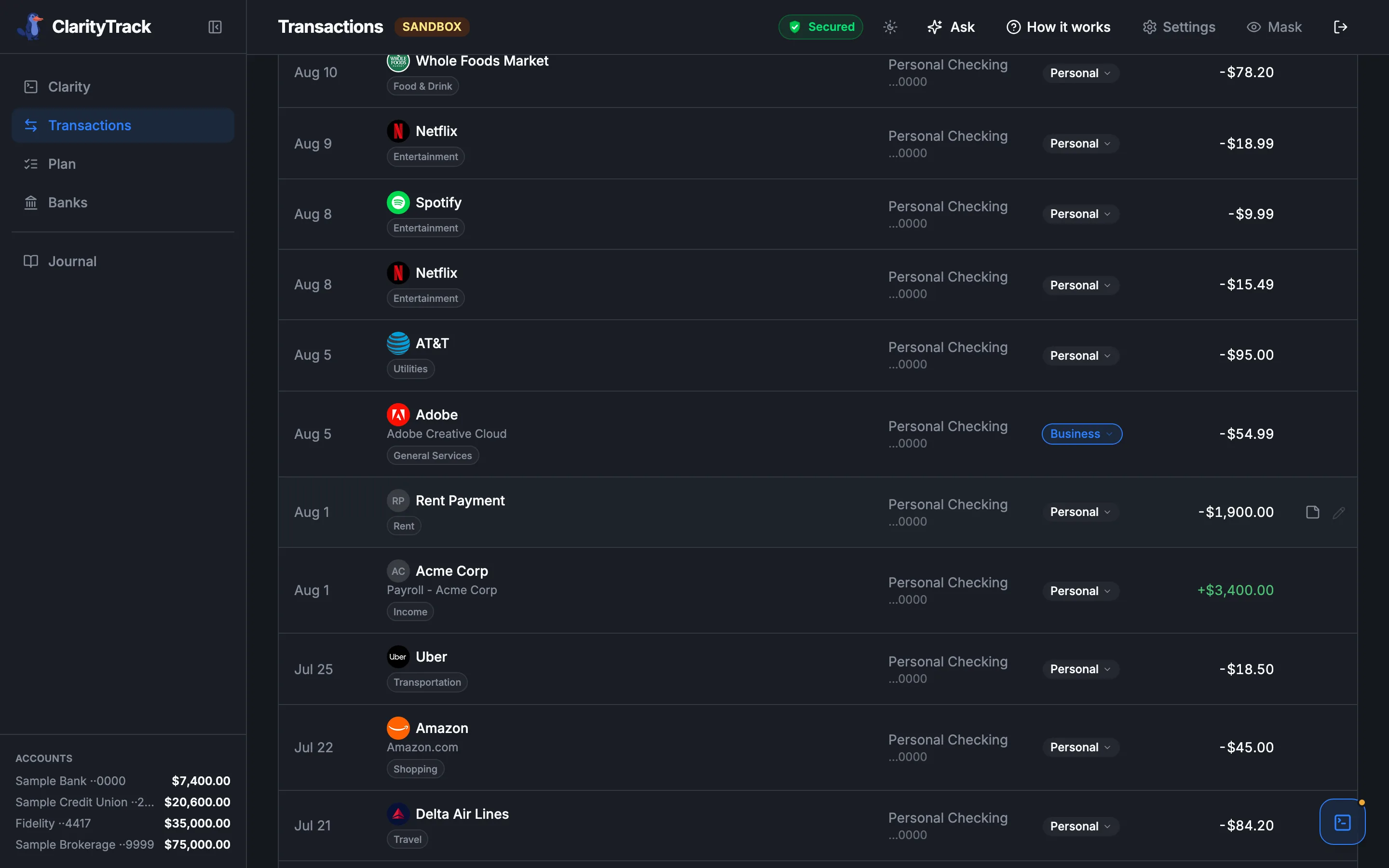
A business tool paid from your personal card? Tag that one charge Business and it counts on the business side.
Move a vendor’s history
Tell Clarity “everything from Adobe is business” and confirm. It moves every existing charge from that vendor, and works for a vendor with up to 100 charges. Charges that arrive later aren’t moved automatically.
Undo puts it back
Changed your mind? Ask Clarity to undo the move, and every charge you haven’t changed since goes back to the side it was on.
What the business has left
See what the business has left after the next 30 days
Ask Clarity what the business has left, and it answers with four readings, the same four the coverage card shows in the app. When transfers between your own accounts have been matched, the card adds lines for your pay from the business, covered next.
- Cash on hand: the cash in your business accounts.
- Committed, next 30 days: the recurring charges and card minimums it can see coming.
- What is left: cash on hand minus what's committed.
- Expense pattern: how steady business spending has been. It needs three complete months of history, and says so until it has them.
ClarityTrack fills in these figures from your accounts. The AI explains them; it doesn’t write them.
Your pay from the business
See what you paid yourself, and whether it’s steady
What you paid yourself, and what you put in
See what you paid yourself from the business over the last 90 days and what you put into it, matched from transfers between your own bank accounts. App payments like Zelle and Venmo aren't counted.
Is your pay steady?
Know whether your pay from the business is steady, and see it flagged when a usual payment runs late.
A transfer out of one account is matched with a transfer into the other for the same amount, to the cent, a few days apart. Payments sent through Zelle, Venmo, Cash App, PayPal or Apple Cash, cash withdrawals and checks aren’t matched, and a transfer with no match is left out, not guessed at. A steady pattern needs at least 3 payments spread over at least 60 days, and late means a regular pattern has gone quiet well past its usual gap: for monthly pay, that’s about 48 days since the last one. The totals cover the last 90 days. In the app, these lines show once your personal and business sides both have transactions and a transfer has been matched in the last 90 days. ClarityTrack only reads these transfers, and it never moves money.

Day to day
Tax money, bills, bank fees and the same charge twice
Keep the tax money back
Set a tax set-aside goal: the amount, and the date you need it by. Progress is measured against the cash in your business accounts, never your personal savings. It’s a target you set, not a tax estimate, and it doesn’t lock any money away.

Same charge, two accounts
When the same merchant charges the same amount to a business account and a personal one within 2 days, Clarity points it out and asks. It looks at charges of $20 or more. Paying for it on both may be on purpose, so one tap marks it as intentional, and Undo takes that back.
Business tools on one list, personal on the other
Subscriptions and bills are split into Personal and Business. A business tool paid from a personal card sits under Business once its latest charge is tagged Business, and the row names the card that pays it. It never guesses from the merchant’s name.

See what the bank charges
Every bank fee is listed charge by charge, over the last 30 days, 90 days or 12 months, with what it costs over a year and a next step for each kind. For a late or overdraft fee, ClarityTrack drafts a waiver request you copy and send yourself. It never contacts your bank. Fees show once there are 90 days of history.

Screens from the business demo’s sample workspace.
Which plan
Business is the plan for business money
Personal
For your own money. $9.99 a month or $99 a year.
Business
For your money and your business’s, kept apart. Up to 5 financial contexts on one subscription. $29 a month, or $199 a year for the first 100 founding subscribers, then $290 a year.
Both plans start with a 30-day free trial. If you are already over a limit, nothing is taken away: the limits apply when you add something new.
Next on the business plan
- Have your plan pace itself against your pay from the business, so a missed payment changes the numbers.
- Count what a personal card pays for the business as money you put in, not only the transfers between your own accounts.
What it isn’t
It isn’t bookkeeping
It doesn’t do invoices, payroll, a ledger or tax filing, so your books and your accountant stay where they are. ClarityTrack reads the transactions in your accounts, so it can tell you what came in, not what you earned. And it never moves, sends or spends money.